
A Windows-compatible digital microscope can mean a pocket camera plugged into a laptop, a WiFi unit that switches to USB for PC viewing, or a larger LCD system that sends video to a computer. That difference shapes the entire experience. A compact camera may suit coins, insects, and quick PCB checks, while electronics repair calls for a stand, adjustable focus, and enough room to work beneath the lens.
Advertised magnification deserves a careful reading. Numbers such as 1,000x or 2,000x describe an enlargement claim, not automatically the amount of fine detail the optics can resolve. Windows support also varies. Some models use standard camera software, some require a particular application or privacy setting, and some offer extra capture or measurement functions only through a computer connection.
The strongest options below cover those different workflows rather than treating every microscope as interchangeable. The Andonstar AD249S-M leads for its larger screen, interchangeable lenses, HDMI output, and Windows measurement software. More compact choices make better sense for quick inspection, while the TOMLOV DM9 offers a built-in display and documented storage without requiring a laptop for every observation.
Quick Answer
- Best Overall: Andonstar AD249S-M 3 Lens 2160P 10.1 Inch HDMI Digital Microscope 2000x for its Windows compatibility, three-lens setup, HDMI output, and measurement software.
- Best Value With a Built-In Screen: TOMLOV DM9 7″ Digital Coin Microscope 1200X for its 7-inch display, adjustable stand, image capture, and included storage.
- Best Compact USB Option: Plugable USB Digital Microscope 250x for broad Windows connectivity, USB-C support, and a flexible arm stand.
- Best Budget Windows Microscope: USB Digital Microscope 40X to 1000X for its low price, adjustable lighting, stand, carrying case, and Windows measurement software.
Best Digital Microscopes for Windows Comparison Table
| Product | Best For | Viewing Method | Windows Connection | Capture Features | Notable Detail |
|---|---|---|---|---|---|
| Andonstar AD249S-M 3 Lens 2160P 10.1 Inch HDMI Digital Microscope 2000x | Overall Windows workstation | 10.1-inch LCD, HDMI, PC | Windows-compatible software | Photos and videos to Micro SD | Three interchangeable lenses |
| TOMLOV DM9 7″ Digital Coin Microscope 1200X | Coins and close-up inspection | 7-inch LCD, PC | Windows/Mac computer connection | 12MP photos, 1080P video, 16GB card | Metal stand and flexible lights |
| Andonstar AD246S-M 3 Lens 2160P HDMI Digital Microscope 2000x | Multi-purpose bench work | 7-inch LCD, HDMI, PC | Windows-compatible software | Photos and videos to Micro SD | Three interchangeable lenses |
| Plugable USB Digital Microscope 250x | USB computer viewing | Windows screen | USB and USB-C/Thunderbolt | Standard webcam software support | Flexible arm stand |
| Jiusion 4K 50-1000x WiFi USB Digital Handheld Microscope with Metal Stand | Wireless and USB flexibility | Windows screen or mobile device | USB connection to PC | Computer and mobile viewing | 3840x2160P claim and 8 LEDs |
| Wireless Digital Microscope, Skybasic 50X-1000X Magnification WiFi Portable Handheld Microscopes with Adjustable Stand HD USB Microscope Camera Compatible with iPhone Android iPad Windows Mac Computer | Portable everyday inspection | Windows screen or mobile device | USB connection to PC | 1920×1080 images, photo and video | 3-60 mm focal length range |
| Elikliv Microscope, Digital Coin Microscope 1000x with Lights, EDM4, 4.3” | Portable standalone viewing | 4.3-inch LCD, PC | Windows/MacBook connection | Photos and videos, card required | Rechargeable battery |
| USB Digital Microscope 40X to 1000X, 8 LED Magnification Endoscope Camera with Carrying Case & Metal Stand | Budget Windows inspection | Windows screen | Windows 7, 8, 10, 11 | Photos, videos, Windows measurement | Carrying case and metal stand |
| Jiusion 40 to 1000x Magnification Endoscope, 8 LED USB 2.0 Digital Microscope | Basic Windows and Android use | Windows screen | Windows XP through 11 | Photos, videos, Windows measurement | OTG adapter and metal stand |
The practical differences become clearer once the viewing method, stand, and Windows workflow are separated from the headline magnification number.
1. Andonstar AD249S-M 3 Lens 2160P 10.1 Inch HDMI Digital Microscope 2000x — Best Overall

The AD249S-M is the most complete Windows-oriented workstation in this group. Its 10.1-inch LCD gives the operator a built-in view, while the supplied HDMI connection can send the microscope signal to a compatible larger monitor. The three-lens arrangement is more meaningful than a single headline magnification figure: Lens L is listed for soldering and repair, Lens A for coins and larger objects, and Lens D for biological slides.
Windows users also get access to the supplied measurement software for length and area calculations, along with photo and video functions. The adjustable boom arm can move front to back, left to right, and by angle, which matters when a board, coin, or slide needs a different position. The listing identifies 2160P video recording, eight lighting levels, a remote control, and a 32GB Micro SD card, creating a broader workflow than a basic USB camera.
Pros
- Includes three lenses for repair, general close-up viewing, and biological slides.
- Provides a 10.1-inch built-in LCD for computer-free viewing.
- Supports HDMI output to a compatible external monitor.
- Includes Windows measurement software for length and area functions.
- Offers an adjustable boom arm, eight lighting levels, remote control, and Micro SD storage.
Cons
- The larger stand and lens system require more workspace than a handheld USB microscope.
- The published specifications do not identify the native sensor resolution or measurement accuracy.
This is the strongest fit for Windows users who want a bench setup that can move between electronics, coins, demonstrations, and documented measurements. A compact USB model is easier to carry, while the smaller Andonstar AD246S-M costs less and occupies less visual space.
To buy this product, click here.
2. TOMLOV DM9 7″ Digital Coin Microscope 1200X, Soldering Scope for Adults | Metal Base, Ultra-Precise Focus, 12MP Photo/1080P Video, 10 LEDs, Error Coin View, PCB Repair, for Collectors, PC View, 16GB — Best Value With a Built-In Screen

The DM9 suits someone who wants a screen at the bench without making Windows the only way to see an object. Its 7-inch LCD displays the live image directly, and the microscope can connect to a Windows or Mac computer for a larger shared view. That split is handy for a collector comparing mint marks beside a laptop or a teacher showing a small surface detail to several people around a table.
The documented setup is especially focused on coins, small PCB work, jewelry, watch parts, and other surface inspections. A metal base, adjustable 8.5-inch stand, eight built-in LEDs, and two flexible gooseneck lights give the operator several ways to position the subject and shape illumination. The 12MP photo specification, 1080P video recording, wired remote, and included 16GB card also make collection records easier to organize, although magnification alone cannot authenticate a coin or prove that a mark is a genuine mint error.
Pros
- Includes a 7-inch LCD for standalone viewing.
- Connects to Windows and Mac computers for a larger real-time image.
- Combines eight built-in LEDs with two flexible gooseneck lights.
- Provides 12MP photo and 1080P video recording specifications.
- Includes a metal base, adjustable stand, wired remote, and 16GB memory card.
Cons
- The published specifications do not clearly identify the native sensor resolution.
- The coin-focused design is less portable than a handheld Windows USB microscope.
Choose the DM9 for a Windows desk where standalone viewing, coin documentation, and adjustable lighting matter more than pocket size. The Plugable is a better fit for a simple computer-camera workflow, while the Andonstar models provide more lens choices and HDMI output.
To buy this product, click here.
3. Andonstar AD246S-M 3 Lens 2160P HDMI Digital Microscope 2000x for Adults | 7 Inch LCD Soldering Microscope for Electronics Repair, Error Coins, Pro Boom Arm Stand, Windows Compatible — Best Multi-Purpose Bench Option

The AD246S-M shares the same three-lens concept as the larger Andonstar, but its 7-inch LCD makes it the more compact member of that pair. Lens L is listed for soldering and repair, Lens A for coins, plants, and stones, and Lens D for biological slides. That range gives a Windows user a way to switch tasks without relying on one fixed optical arrangement.
Its boom arm adjusts front to back, left to right, and by angle, while the focus wheel and stand knob handle positioning. The microscope records 2160P video, offers HDMI output, and includes Windows measurement software for length and area calculations. Eight lighting levels, a remote, prepared slides, an observation box, tweezers, and a 32GB Micro SD card round out the kit, though the smaller screen provides less viewing area than the AD249S-M.
Pros
- Includes Lens L, Lens A, and Lens D for different observation tasks.
- Provides a 7-inch built-in LCD for direct viewing.
- Supports HDMI output and 2160P video recording according to the listing.
- Includes Windows software for length and area measurement functions.
- Offers a multi-directional boom arm, adjustable lighting, remote control, and 32GB storage.
Cons
- The 7-inch screen is smaller than the display on the AD249S-M.
- The published specifications do not establish native optical resolution or measurement accuracy.
This model fits Windows users who want the Andonstar lens flexibility in a somewhat smaller display package. The TOMLOV DM9 offers a simpler coin and close-up workflow, while a handheld WiFi model takes up far less room.
To buy this product, click here.
4. Plugable USB Digital Microscope 250x, 2MP Micro Camera, Flexible Arm Stand | Handheld USB & USB-C Microscope for Windows, Mac, ChromeOS, Linux, Android, iPad Compatible — Best Compact USB Option

The Plugable takes a cleaner route than the screen-equipped models. It is a USB microscope camera intended for viewing through a Windows computer, laptop, or tablet, and the supplied connectors cover USB and USB-C/Thunderbolt ports. Its webcam chipset and standard webcam software support also make it a practical choice for someone who wants a direct computer workflow rather than a proprietary display system.
A flexible arm stand and observation pad give it more structure than a camera held in the air, while the microscope can also be used handheld for quick checks. The documented range is 60x to 250x, with a 2.0MP specification and a brightness-controlled LED halo light listed at 7000K and 0-38 lumens. That lower advertised range should be read as a practical inspection orientation, not a weakness by itself, since huge magnification claims often enlarge the image without establishing extra resolved detail.
Pros
- Supports Windows, Mac, ChromeOS, Linux, Android, and iPad according to the product information.
- Includes connectors for USB and USB-C/Thunderbolt ports.
- Works with standard webcam software through its webcam chipset.
- Combines handheld use with a flexible arm stand and observation pad.
- Provides a 2.0MP camera and brightness-controlled LED halo lighting.
Cons
- It does not include a built-in LCD for standalone viewing.
- Its advertised 60x to 250x range is lower than the larger numbers claimed by several handheld alternatives.
The Plugable makes sense for Windows users who value broad computer connectivity and a simple USB camera format. It is less suitable for someone who wants HDMI output, a large independent screen, or a multi-lens bench system.
To buy this product, click here.
5. Jiusion 4K 50-1000x WiFi USB Digital Handheld Microscope with Metal Stand — Best WiFi and USB Flexibility

The Jiusion gives Windows users a choice between a wired PC connection and wireless viewing on a phone or tablet. The supplied compatibility list includes Windows XP, 7, 8, 10, and 11, along with Mac, Linux, and Chrome OS. That flexibility suits a household where a microscope may move from a Windows laptop to a phone during a quick look at a coin, leaf, insect, or circuit board.
The product information identifies a 3840x2160P claim, eight LEDs, focus and brightness controls, and a metal stand. The phone and tablet zoom buttons offer 1.2x through 2.0x settings, but those buttons do not work when the microscope is connected to Windows, Mac, Linux, or Chrome OS. That detail matters at a desk, where the image workflow depends on the computer software and the camera’s physical controls rather than the mobile zoom buttons.
Pros
- Supports wired Windows use and wireless mobile-device viewing.
- Lists compatibility with Windows XP, 7, 8, 10, and 11.
- Includes compatibility with Mac, Linux, and Chrome OS as well.
- Provides eight LEDs plus separate focus and brightness controls.
- Includes a metal stand and a stated 3840x2160P image claim.
Cons
- The mobile zoom buttons do not function during Windows computer use.
- The listing does not identify the native sensor resolution or optical basis of the 4K claim.
This Jiusion is a useful match for Windows users who also want wireless mobile viewing and a compact stand. The Plugable offers a simpler computer-first connection, while the TOMLOV and Andonstar models are better for users who prefer a built-in display.
To buy this product, click here.
6. Wireless Digital Microscope, Skybasic 50X-1000X Magnification WiFi Portable Handheld Microscopes with Adjustable Stand HD USB Microscope Camera Compatible with iPhone Android iPad Windows Mac Computer — Best Portable Everyday Option

Skybasic’s main appeal is the two-part connection routine. A phone or tablet can connect to the microscope’s WiFi hotspot, while a Windows computer uses the included USB cable. For a Windows user checking a stamp at a desk, then taking the microscope outside to inspect a plant or rock, that split can feel more natural than carrying a larger LCD unit.
The listing specifies 1080P image quality for a smartphone, 720P for a computer, a 2MP HD CMOS sensor, eight adjustable LEDs, and a 3-60 mm focal length range. Windows setup may involve camera privacy permissions, disabling the built-in laptop camera, and AMCap on Windows 7 or 8. The product is described as closer to a fixed-focus magnifying glass than a traditional microscope, so it belongs with surface inspection and nature exploration rather than serious biological microscopy.
Pros
- Supports WiFi viewing on iOS and Android devices.
- Connects to Windows and Mac computers through USB.
- Provides eight adjustable LED lights.
- Lists a 2MP HD CMOS sensor with 1080P smartphone and 720P computer image quality.
- Documents a 3-60 mm focal length range and one-button photo or video capture.
Cons
- Windows setup may require camera-permission changes and additional software on some versions.
- The product is described as a fixed-focus magnifying glass rather than a traditional microscope.
Pick this model for portable Windows viewing of coins, plants, insects, minerals, and other opaque objects. The Jiusion 4K model presents a higher stated image claim, while the Plugable is a better fit for users who want a straightforward USB computer camera without WiFi setup.
To buy this product, click here.
7. Elikliv Microscope, Digital Coin Microscope 1000x with Lights, EDM4, 4.3” | 8 Adjustable LED Lighting, 720P LCD Microscope, Built-in Rechargeable Battery, Take Photos/Videos, Windows/MacBook Compatible — Best Portable Standalone Viewing

The Elikliv places a small screen and rechargeable power system inside a compact coin-inspection format. Its 4.3-inch LCD shows the live image without a Windows computer, but the microscope can also connect to Windows or MacBook for a larger view and file organization. That makes it useful for a collector who wants to inspect a coin away from the desk and later move the work to a computer.
Eight adjustable LEDs and a height-adjustable stand help with surface details, while the listing identifies up to three hours of continuous use. The product supports photos and videos, though a memory card must be supplied separately. The advertised 1,000x figure should be treated as an enlargement claim because the listing itself says actual magnification varies with screen size and camera-to-object distance.
Pros
- Includes a 4.3-inch 720P LCD for standalone viewing.
- Connects to Windows and MacBook for larger viewing and file organization.
- Provides eight adjustable LED lights.
- Includes a height-adjustable stand for changing camera-to-object distance.
- Lists a built-in rechargeable battery with up to three hours of continuous use.
Cons
- A memory card is required for photo and video storage but is not included.
- The published information says actual magnification varies with screen size and camera distance.
This Elikliv suits Windows users who want an independent screen and rechargeable operation in a smaller package. The TOMLOV DM9 gives a larger display and more elaborate lighting, while a USB handheld model is easier to integrate into a computer-only workflow.
To buy this product, click here.
8. USB Digital Microscope 40X to 1000X, 8 LED Magnification Endoscope Camera with Carrying Case & Metal Stand, Compatible for Android Windows 7 8 10 11 Linux Mac (Not for iPhone/iPad) — Best Budget Windows Microscope
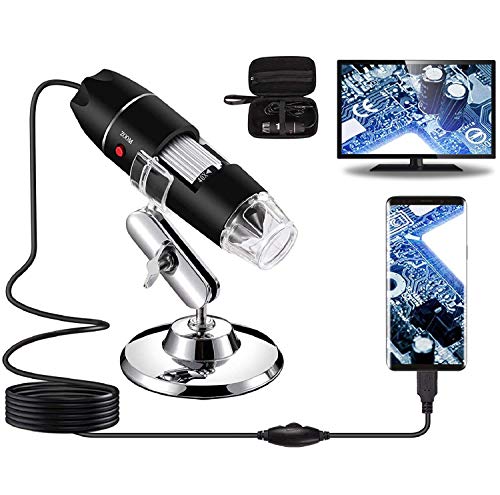
This Bysameyee model is a low-cost Windows USB microscope with a useful collection of practical accessories. The listing specifically supports Windows 7, 8, 10, and 11, and its measurement software is identified as Windows-only. A metal stand, carrying case, ruler, OTG adapter, driver, and adjustable LED control give a beginner more structure than a bare camera module.
The eight LEDs shine through a diffuser, and the supplied information lists photo capture, video recording, and measurement functions after connection to a compatible device. It also works with Mac OS X, Linux, and Android phones with OTG, but it does not work with iPhone or iPad. That restriction is easy to overlook if the microscope is being purchased for a mixed-device household, so Windows remains its clearest target.
Pros
- Lists compatibility with Windows 7, 8, 10, and 11.
- Includes Windows measurement software.
- Provides eight adjustable LEDs with a diffuser.
- Includes a metal stand, ruler, carrying case, and OTG adapter.
- Supports screenshot capture and video recording through connected-device software.
Cons
- It does not work with iPhone or iPad.
- The measurement software is identified as Windows-only.
This is a sensible budget pick for Windows users inspecting coins, hair, skin, PCB details, or small objects without needing a built-in display. The Plugable offers broader operating-system and connector coverage, while the Jiusion WiFi models are better for wireless phone viewing.
To buy this product, click here.
9. Jiusion 40 to 1000x Magnification Endoscope, 8 LED USB 2.0 Digital Microscope, Mini Camera with OTG Adapter Metal Stand, Compatible with Mac Windows 7 8 10 11 Android Linux Chrome Not for iPhone/iPad — Best Basic Windows USB Option
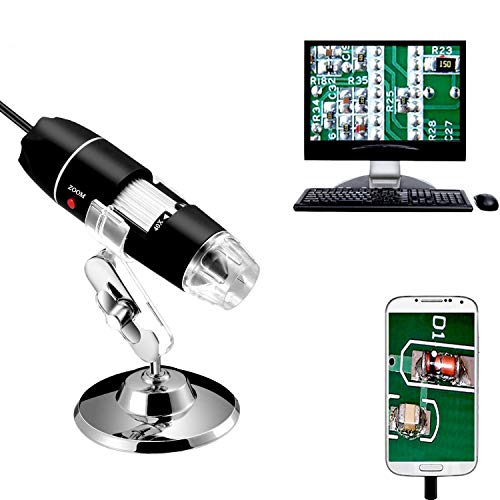
The older Jiusion USB 2.0 model keeps the Windows setup straightforward. Its documented compatibility includes Windows XP, Vista, 7, 8, 10, and 11, along with Mac, Linux, and Chrome OS. It also supports Android phones with OTG, but the listing specifically excludes iPhone and iPad, making it a better match for a Windows and Android household than an Apple-focused setup.
Physical controls handle focus and brightness, and eight LEDs illuminate the subject. Once connected, the microscope can capture screenshots and record video, while the Windows software includes a measurement function. The included OTG adapter, metal stand, and adjustable lighting control improve the basic package, although the published information does not identify a native sensor resolution, image dimensions, or a built-in screen.
Pros
- Supports Windows XP, Vista, 7, 8, 10, and 11.
- Also lists compatibility with Mac, Linux, Chrome OS, and OTG-enabled Android devices.
- Includes eight LEDs with separate focus and brightness controls.
- Supports screenshots, video recording, and a Windows measurement function.
- Includes an OTG adapter and metal stand.
Cons
- It is not compatible with iPhone or iPad.
- The published specifications do not identify native sensor resolution or captured image dimensions.
This Jiusion belongs on a short list for shoppers who need a basic Windows USB microscope at a modest price and already understand its iOS restriction. The Bysameyee adds a carrying case and ruler, while the Plugable offers a more broadly documented modern connector setup.
To buy this product, click here.
Buying Guide
Start With The Windows Viewing Method
A Windows microscope may display through a USB camera connection, a proprietary application, WiFi that switches to USB for computer use, or a standalone LCD with optional PC viewing. A USB-first model such as the Plugable keeps the desk tidy around a laptop, while the Andonstar and TOMLOV models let someone inspect an object on an integrated screen before opening Windows software.
Check the exact Windows versions and setup instructions. The Skybasic listing mentions camera privacy settings and disabling the computer’s built-in camera in some situations. The Bysameyee and older Jiusion explicitly list Windows versions, but their mobile restrictions differ, so a microscope that works with a Windows laptop may still be unsuitable for an iPhone or iPad.
Read Magnification Claims With Care
Advertised values such as 1,000x, 1,200x, and 2,000x describe enlargement claims, not a guaranteed level of resolved detail. Digital scaling can make a mark look larger on the screen without revealing new information. A lower stated range, such as the Plugable’s 60x to 250x, may still be sensible for ordinary surface inspection.
Focus control, camera-to-object distance, field of view, and lighting often shape the useful image more than the biggest number printed on the box. The Skybasic listing gives a 3-60 mm focal length range, while the Elikliv information says actual magnification varies with screen size and distance. Those details show why a single headline number cannot predict every Windows viewing task.
Match The Stand To The Object
A handheld camera works well for a quick look at a leaf, coin, or fabric weave, but a stand matters once the image needs to stay in one place. The Plugable includes a flexible arm, the budget Bysameyee and older Jiusion include metal stands, and the TOMLOV and Andonstar models use larger adjustable arrangements.
Electronics work adds another question: can the object be positioned while tools remain accessible? The Andonstar listings describe boom arms that adjust in several directions, while the TOMLOV DM9 offers an adjustable stand and metal base. The supplied information does not establish exact working-distance measurements, so buyers should avoid assuming that any advertised soldering label guarantees clearance for every repair.
Choose Lighting For The Surface
Eight LEDs sound similar across several compact models, but illumination is useful only when it reveals the surface rather than creating a bright reflection. Coins, polished metal, jewelry, and solder joints may need brightness changes or a different light angle. The TOMLOV DM9 adds two flexible gooseneck lights, while the Andonstar models list eight lighting levels.
Handheld models generally keep the light near the lens, which can work for quick close-up viewing but offers less documented control over lighting direction. The Bysameyee listing describes LEDs shining through a diffuser, and the Plugable includes brightness control on its halo light. These features help with adjustment, but none of the supplied products should be described as eliminating glare in every situation.
Separate Display Resolution From Camera Detail
A 7-inch or 10.1-inch display changes how comfortably several people can view a live image, but screen size does not establish optical resolution. The TOMLOV DM9 has a 7-inch LCD, the AD246S-M has a 7-inch LCD, and the AD249S-M has a 10.1-inch LCD. Those dimensions describe the viewing surface, not the amount of fine detail captured by the sensor.
Likewise, a 2160P or 4K claim needs context. The Andonstar listings identify 2160P video recording and HDMI output, while the Jiusion listing identifies a 3840x2160P claim. The published information does not establish that these figures represent native sensor resolution or equivalent optical detail, so use them as part of the specification picture rather than as a complete quality ranking.
Check Capture, Storage, And Measurement Requirements
Windows software can turn a microscope into a useful documentation tool, but features vary by model. The Andonstar models list measurement software for length and area, and the two basic USB models describe Windows measurement functions. Software precision is not the same as measurement accuracy, however. Accurate physical measurements require suitable calibration and a controlled setup, neither of which is fully documented for every product here.
Storage also changes the workflow. The TOMLOV DM9 includes a 16GB card, the Andonstar models include Micro SD cards, and the Elikliv requires a memory card for photo and video storage. A computer-dependent microscope can save through Windows software, while a standalone LCD model may save directly to removable storage, so check where the files will live before choosing a format.
Best Digital Microscopes For Windows FAQ
What Is The Best Digital Microscope For Windows?
The Andonstar AD249S-M is the strongest overall fit in this selection because it combines documented Windows measurement software, a 10.1-inch LCD, HDMI output, three lenses, adjustable mounting, and onboard recording. A smaller USB camera is more appropriate for quick inspections, while the TOMLOV DM9 is better for standalone coin and surface viewing.
Do All Windows Digital Microscopes Need Special Software?
No. The supplied products use different workflows. The Plugable is described as supporting standard webcam software, while the Skybasic listing identifies Max-see for mobile use and additional setup details for some Windows versions. The Andonstar and basic USB models list measurement software, so check the product’s instructions before assuming Windows Camera or another application will provide every feature.
Can A Windows Digital Microscope Measure Objects?
Some models list measurement functions, including the Andonstar AD249S-M, Andonstar AD246S-M, Bysameyee, and older Jiusion. Those functions can calculate values from the displayed image, but the supplied information does not establish measurement accuracy or calibration quality. Treat software measurement as a documented feature, not as proof of precision metrology.
Is 1,000x Magnification Better Than 250x?
Not automatically. Magnification enlarges an image, while resolution determines whether additional fine detail can be distinguished. The Plugable’s 60x to 250x range may be adequate for many surface inspections, while a microscope advertising 1,000x may rely partly on digital enlargement. Focus, lighting, camera distance, and field of view all affect the useful result.
Can These Microscopes Replace A Biological Microscope?
The supplied listings position these products mainly for opaque surface inspection, coins, electronics, plants, insects, jewelry, and similar objects. The Andonstar models include a lens listed for biological slides, but high advertised magnification alone does not establish bacterial, cellular, or subcellular resolution. Serious biological work may require a different optical system and specimen preparation method.
Which Windows Microscope Is Best For PCB Inspection?
The Andonstar models offer the clearest documented bench-oriented features, including repair-focused lenses and adjustable boom arms. The TOMLOV DM9 also lists PCB inspection, an adjustable stand, and flexible lights. A compact model such as the Plugable or Jiusion can handle quick checks, but the supplied information does not provide exact working-distance measurements for any of these options.
Can A Digital Microscope Authenticate Coins?
No microscope in this selection should be treated as an authentication device. Magnified images can help reveal dates, mint marks, scratches, die cracks, and surface texture, but they do not establish authenticity, grade, value, or whether an unusual mark is a genuine mint error. The TOMLOV DM9 and Elikliv are useful for documenting visible details, with that limitation in mind.
Do Windows-Compatible Models Work With IPhone And IPad?
Compatibility varies by product. The Jiusion 4K and Skybasic WiFi models list iOS support, while the Bysameyee and older Jiusion USB models explicitly exclude iPhone and iPad. Windows compatibility should be checked separately from mobile compatibility because a USB connection, app, and camera permission requirement may differ across platforms.
Final Verdict
The Andonstar AD249S-M is the best overall Windows choice because its documented feature set reaches beyond simple magnification. The 10.1-inch LCD, three interchangeable lenses, HDMI output, Windows measurement software, adjustable boom arm, lighting controls, and onboard storage address a broad mix of inspection and documentation tasks.
Buyers with a smaller desk may prefer the 7-inch Andonstar AD246S-M, while the TOMLOV DM9 offers a strong standalone coin and close-up workflow at a lower listed price. For compact computer viewing, the Plugable is the clearest USB-first option. Budget shoppers can use the Bysameyee or older Jiusion, provided their Windows and mobile compatibility restrictions fit the intended setup.
