
A Mac-compatible digital microscope has to solve two problems at once: produce a usable close-up image and connect reliably to macOS. A microscope can advertise 1,000x magnification yet remain a poor Mac choice if its software, connector, or operating-system support is unclear. The strongest options here either document Mac compatibility directly or use a standard USB camera approach that supports macOS.
The main trade-off is between computer-based viewing and standalone inspection. Plugable, Dino-Lite, and the smaller USB models depend on a Mac, tablet, or phone for viewing and recording, while the TOMLOV DM9 and DM4W can show images on their own screens before sending video to a computer. WiFi models add wireless phone viewing, but their Mac connection is wired, and some controls work only on mobile devices.
For most Mac users, the Plugable USB Digital Microscope is the most balanced starting point because its listing specifically includes Mac support, USB and USB-C connectivity, a flexible arm stand, and standard webcam-style operation. The Dino-Lite AM4113T is the more specialized measurement pick, while the TOMLOV DM9 suits shoppers who want a built-in display and a larger stand for coins or electronics.
Quick Answer
- Best Overall: Plugable USB Digital Microscope 250x, 2MP Micro Camera, Flexible Arm Stand for documented Mac compatibility, flexible positioning, and USB or USB-C connection.
- Best for Measurement: Dino-Lite AM4113T for Mac software, MicroTouch image capture, and supported measurement functions.
- Best Standalone Option: TOMLOV DM9 7″ Digital Coin Microscope 1200X for its built-in 7-inch screen, adjustable stand, and Mac computer connection.
- Best Wireless Option: Jiusion 4K 50-1000x WiFi USB Digital Handheld Microscope with Metal Stand for wireless phone viewing and wired Mac connectivity.
Best Digital Microscopes for Mac Comparison Table
| Product | Best For | Connection | Mac Support | Display or Imaging | Advertised Magnification |
|---|---|---|---|---|---|
| Plugable USB Digital Microscope 250x, 2MP Micro Camera, Flexible Arm Stand | General Mac inspection | USB, USB-C, Thunderbolt | Yes | 2MP, LED halo light | 60x to 250x |
| Dino-Lite AM4113T | Measurement | USB | Yes | 1.3MP, 30 FPS video | 20x to 50x, 200x |
| TOMLOV DM9 7″ Digital Coin Microscope 1200X | Coins and electronics | USB to computer | Yes | 7-inch screen, 12MP photos, 1080P video | Up to 1200x |
| Jiusion 4K 50-1000x WiFi USB Digital Handheld Microscope with Metal Stand | Wireless phone viewing | WiFi on mobile, wired on Mac | Yes | 4K claim, 8 LEDs | 50x to 1000x |
| Ninyoon 4K WiFi Microscope for iPhone Android PC | Wide-angle and longer-focus inspection | WiFi on mobile, wired on Mac | Yes | 4K claim, adjustable lighting | 50x to 1000x |
| TOMLOV DM4W Microscope with Weighing Scale | Portable coin inspection | USB output to macOS | Yes | 4.3-inch IPS screen | 10x to 200x |
| Cainda USB Microscope | Portable 1080P viewing | USB, Micro USB, USB-C, Lightning | Yes | 1080P, 8 adjustable LEDs | Not clearly specified |
| USB Digital Microscope 40X to 1000X | Budget Mac inspection | USB | Yes | Adjustable 8 LEDs | 40x to 1000x |
| Bysameyee 1080P USB Digital Microscope | Four-connector flexibility | USB-A, USB-C, Micro USB, Lightning | Yes | 1080P, 8 LEDs | 50x to 1000x |
These models split into computer-dependent USB cameras, standalone LCD microscopes, and portable wireless or multi-connector designs.
1. Plugable USB Digital Microscope 250x, 2MP Micro Camera, Flexible Arm Stand — Best Overall

Plugable is the clearest all-purpose Mac pick in this group because the supplied specifications directly identify Mac support and include connectors for USB and USB-C or Thunderbolt ports. Its webcam-style design also suits buyers who want to view an object in familiar computer software rather than use a dedicated LCD screen.
The 60x to 250x range is more restrained than the large numbers printed on many inexpensive handheld microscopes, which makes the stated specification easier to interpret. A flexible arm stand, observation pad, handheld use, adjustable LED halo light, and 2MP camera give it a practical mix for coins, small components, classroom demonstrations, and basic electronics inspection.
Pros
- Mac compatibility is specifically listed.
- Supports USB and USB-C or Thunderbolt connections.
- Includes a flexible arm stand and observation pad.
- Can be used handheld or mounted.
- Provides a 2MP camera with adjustable LED halo lighting.
Cons
- Its advertised range stops at 250x, below many inexpensive models’ claimed ranges.
- The supplied specifications do not identify a built-in display for standalone viewing.
Choose it for a Mac-centered inspection desk where connector flexibility and a supported computer workflow matter more than a dramatic magnification number. A standalone TOMLOV model is a better fit for users who want to work without keeping a Mac beside the specimen.
To buy this product, click here.
2. Dino-Lite AM4113T — Best for Measurement

The Dino-Lite AM4113T takes a different route from the inexpensive USB inspection cameras. Its supplied information identifies 20x to 50x and 200x true optical magnification, 1.3MP image resolution, 30 FPS video, and software for both Windows and Mac. That makes it a more focused option for Mac users who need documented software and measurement functions.
MicroTouch image capture and support for inches, millimeters, and micrometers add useful workflow tools for inspection records. Those units do not establish precision measurement accuracy by themselves, so the microscope should be treated as a documented measurement aid rather than a substitute for calibrated metrology equipment.
Pros
- Includes software identified for Windows and Mac.
- Provides 20x to 50x and 200x true optical magnification.
- Supports 1280 x 1024 image resolution.
- Offers 30 FPS video according to the supplied specifications.
- Includes MicroTouch image capture and measurement features.
Cons
- Its 1.3MP resolution is lower than the photo-resolution claims of some newer listings.
- The supplied information does not identify a built-in display or wireless connection.
This is the sensible Mac choice for users who value software tools, annotations, and measurement units. A Plugable or Bysameyee model suits casual surface viewing better if those functions are unnecessary.
To buy this product, click here.
3. TOMLOV DM9 7″ Digital Coin Microscope 1200X — Best Standalone Option

The TOMLOV DM9 is useful for Mac owners who want a microscope that can function before the computer enters the picture. Its built-in 7-inch screen handles direct viewing, while the supplied information also lists a Windows and Mac computer connection for a larger real-time image. That split works well for coin sorting, quick component checks, and shared demonstrations.
The 12MP photo claim, 1080P video capability, 16GB memory card, adjustable stand, and separate lighting controls give it a fuller documentation workflow than a bare handheld camera. The listing also describes a metal base, an 8.5-inch stand, and light soldering support, although the supplied information does not provide a precise working-distance measurement.
Pros
- Includes a built-in 7-inch viewing screen.
- Mac computer connection is specifically listed.
- Supports 12MP photos and 1080P video according to the listing.
- Includes a 16GB memory card for captured files.
- Provides adjustable stand height and multiple lighting controls.
Cons
- The advertised 1200x figure should not be treated as proof of equivalent optical resolution.
- The supplied specifications do not clearly identify the exact macOS software workflow.
The DM9 fits Mac users who want a self-contained screen plus computer viewing, especially for coins and small electronics. A Plugable or Dino-Lite is easier to justify for a software-first Mac setup.
To buy this product, click here.
4. Jiusion 4K 50-1000x WiFi USB Digital Handheld Microscope with Metal Stand — Best Wireless Option

Jiusion gives Mac shoppers two connection paths. The supplied information lists wireless operation with phones and wired operation with a Mac, so it can serve as a mobile inspection camera while remaining usable at a computer desk. Eight LEDs, focus and brightness controls, and an included stand support basic work with coins, circuit boards, jewelry, and natural objects.
The listing describes 3840 x 2160P video transfer, but that 4K label should be read as a stated video capability rather than proof of 4K optical detail. Its phone-only zoom buttons also do not work with Mac, Linux, Chrome, or Windows, a small distinction that matters if computer-based control is your priority.
Pros
- Mac compatibility is specifically listed.
- Provides wireless phone viewing and wired computer operation.
- Includes eight adjustable LED lights.
- Comes with a dedicated stand.
- Offers focus and brightness adjustment controls.
Cons
- The zoom buttons work on phones and tablets but not on Mac computers.
- The 4K description does not establish native sensor resolution or optical detail.
This model suits Mac users who also want wireless phone inspection in a compact package. The Ninyoon is worth comparing for its stated wide-angle and longer-focal-length options, while the Plugable is simpler for a wired Mac workflow.
To buy this product, click here.
5. Ninyoon 4K WiFi Microscope for iPhone Android PC — Best for Flexible Viewing Distance
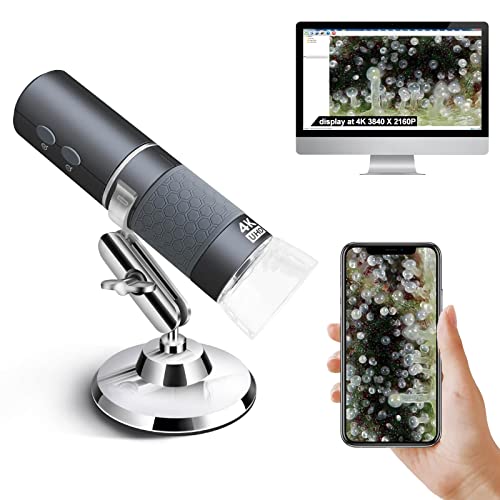
Ninyoon is closely related in concept to the Jiusion model, but its supplied product information highlights wide-angle and long-focal-length options. Those distinctions matter for Mac users who may alternate between viewing a whole coin and leaving more room around a circuit board during close inspection. Wireless operation is aimed at phones, while the Mac connection is wired.
The product information lists iMac, Mac mini, Mac Pro, MacBook Air, and MacBook Pro compatibility alongside Windows, Linux, and Chrome OS. Its 4K wording still needs careful interpretation, and the zoom buttons are documented as mobile-only, so Mac users should expect the computer connection to be primarily a viewing path.
Pros
- Mac compatibility is specifically identified across several Mac computer types.
- Supports wireless phone viewing and wired PC operation.
- Offers stated wide-angle and long-focal-length options.
- Lists 3840 x 2160P video transfer.
- Supports iPhone, iPad, and Android mobile devices.
Cons
- The zoom controls do not operate on Mac computers.
- The 4K claim does not establish native sensor resolution or optical resolution.
Ninyoon makes the most sense for users who switch between mobile viewing and Mac inspection and value the stated lens-position options. For a more conventional webcam-style Mac camera, Plugable remains the cleaner fit.
To buy this product, click here.
6. TOMLOV DM4W Microscope with Weighing Scale: 4.3″ Digital Coin Magnifier — Best Portable Coin Option

The DM4W combines close-up viewing with a built-in scale, giving coin and jewelry users a reason to choose it over a standard Mac camera. Its supplied information lists 0.1g resolution, ±0.5g accuracy, gram, ounce, carat, and troy-ounce units, plus a 4.3-inch IPS screen and USB output to macOS or Windows.
A built-in battery and handheld format support inspection away from an outlet, while the enlarged base and tall stand provide a more structured setup when the microscope is stationary. Weight readings can provide useful reference, but they do not authenticate a coin or gemstone on their own.
Pros
- USB output to macOS is specifically listed.
- Combines magnified viewing with a built-in scale.
- Supports four weight units.
- Includes a 4.3-inch IPS display.
- Provides a built-in battery for cordless use.
Cons
- Its 10x to 200x range is narrower than the advertised ranges of many handheld USB models.
- Weight data cannot independently establish authenticity, purity, or collectible value.
This is a useful Mac accessory for collectors who need visual and weight references in one device. The DM9 offers a larger screen and more extensive photo and video features, while the DM4W favors portability and weighing.
To buy this product, click here.
7. Cainda USB Microscope for iPhone Android Phone Tablet and Windows Mac PC — Best Multi-Connector Budget Option

Cainda is aimed at shoppers who move between a Mac, phone, and tablet and do not want to buy separate adapters. Its four-in-one connector setup includes USB, Micro USB, USB-C, and Lightning connections, while the listing identifies Mac support and driver-free operation after the relevant software is installed.
The 1080P photo and video claim, adjustable eight-LED lighting, cable-mounted controls, and simple stand create a straightforward inspection package. Placing the controls on the cable is intended to reduce lens movement during capture, although the product information does not identify the exact Mac application required.
Pros
- Mac compatibility is specifically listed.
- Includes USB, Micro USB, USB-C, and Lightning connectors.
- Supports 1080P photos and video according to the listing.
- Provides adjustable eight-LED lighting.
- Uses cable-mounted controls to help avoid pressing the camera itself.
Cons
- Android use requires OTG support.
- The supplied information does not clearly specify the magnification range.
Cainda suits Mac households that also use several mobile connector types and want a low-cost camera for coins, plants, crafts, or basic board inspection. Buyers who need documented magnification or a more substantial stand should look at Plugable or Dino-Lite.
To buy this product, click here.
8. USB Digital Microscope 40X to 1000X, 8 LED Magnification Endoscope Camera — Best Budget Mac Option
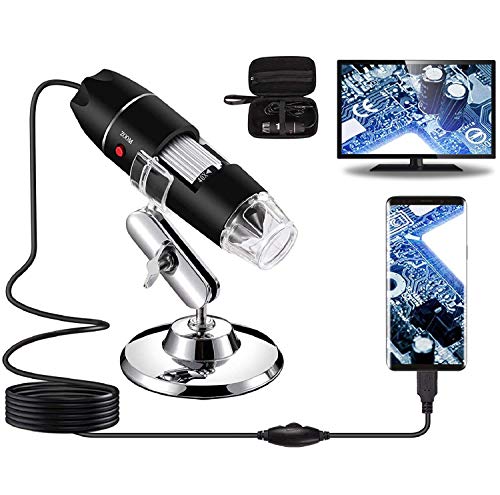
This inexpensive USB microscope covers the basics for Mac users: wired computer connection, adjustable eight-LED lighting, image capture, video recording, and a supplied metal stand. The listing identifies Mac OS X support and includes a carrying case, ruler, and OTG adapter for broader use outside a desktop setup.
Its measurement software is limited to Windows according to the supplied information, so Mac buyers should view it as an imaging and observation tool rather than a Mac measurement system. The 40x to 1000x figure is an advertised range and should not be read as a guarantee of optical resolution across the entire scale.
Pros
- Mac OS X compatibility is specifically listed.
- Includes adjustable eight-LED lighting.
- Supports screenshot and video capture.
- Includes a metal stand and carrying case.
- Provides an OTG adapter and ruler in the listed package.
Cons
- The measurement software works only for Windows.
- It does not support iPhone or iPad according to the listing.
This model is appropriate for Mac users who need a basic wired inspection camera at a low price and can live without Mac measurement tools. Cainda or Bysameyee is more convenient for users who need Lightning and USB-C connectors.
To buy this product, click here.
9. Bysameyee 1080P USB Digital Microscope with Metal Stand — Best Four-Connector Alternative
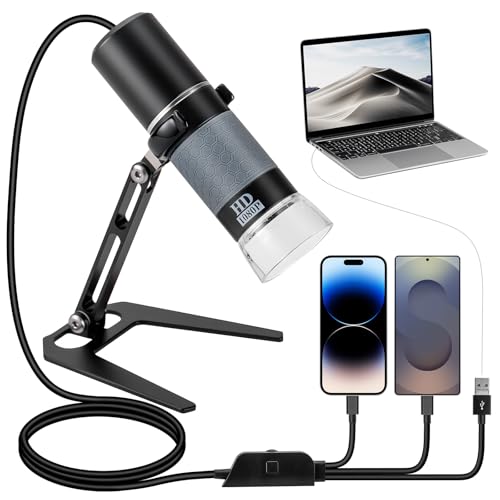
Bysameyee offers a compact Mac-compatible USB camera with four connector types: USB-A, USB-C, Micro USB, and Lightning. That arrangement is useful for a MacBook or desktop user who also wants to inspect objects with a phone or tablet, provided the mobile device supports the required OTG function.
The supplied information identifies 1080P imaging, adjustable eight-LED lighting, cable-based camera and brightness controls, and a metal stand. The cable controls keep fingers away from the camera during capture, while the stated 50x to 1000x range gives users several advertised viewing levels without establishing how much fine detail the optics resolve.
Pros
- Mac compatibility is specifically listed.
- Includes USB-A, USB-C, Micro USB, and Lightning connectors.
- Supports 1080P real-time viewing and recording.
- Provides adjustable eight-LED lighting.
- Includes a metal stand with camera and light controls on the cable.
Cons
- Mobile use requires OTG support where applicable.
- The supplied information does not identify Mac-specific software or measurement support.
Bysameyee fits shoppers who value connector flexibility and simple surface inspection more than a built-in screen or specialized Mac software. Plugable is the stronger general computer option, while Dino-Lite is better suited to documented measurement workflows.
To buy this product, click here.
Buying Guide
Start With The Mac Connection
Mac compatibility should appear in the product information, not be inferred from a USB plug alone. Plugable, Dino-Lite, Jiusion, Ninyoon, Cainda, Bysameyee, and the budget USB model explicitly identify Mac support. Check whether the microscope connects by USB, whether it uses a proprietary application, and whether the listed features work on macOS rather than only on a phone or Windows computer.
Choose Computer Viewing Or A Built-In Screen
A USB camera keeps the Mac at the center of the workflow, which is useful for recording, larger viewing, and software-based inspection. The TOMLOV DM9 and DM4W add built-in screens, so a user can inspect coins or components without opening a Mac first. Standalone displays are convenient, but their presence does not automatically establish better optical resolution.
Treat Magnification Numbers Carefully
Advertised magnification ranges vary widely across inexpensive microscopes. A 1,000x label does not prove that the device resolves more detail than a 250x model, since magnification can include display enlargement or digital scaling. The Dino-Lite listing is more specific by identifying true optical magnification, while several other products provide advertised ranges without explaining their optical basis.
Match The Stand To The Work
A handheld camera is useful for quick checks, but a stand makes repeated Mac viewing easier because the lens remains positioned over the specimen. Plugable supplies a flexible arm stand, the TOMLOV models use taller stand arrangements, and the smaller USB cameras include simpler stands. For soldering or tool-based work, look for documented clearance and adjustment information rather than assuming a tall stand automatically provides enough working room.
Look At Lighting As Part Of The Image
Adjustable LEDs help users change brightness around coins, polished metal, solder joints, and small components. More LEDs do not automatically mean better detail, since reflective surfaces can produce glare or washed-out highlights. Models with brightness controls, such as Plugable, Jiusion, Ninyoon, Cainda, and Bysameyee, give users more control than a fixed light source.
Separate Mac Imaging From Mac Measurement
Many microscopes can show or record an image on a Mac, but that does not mean they support calibrated measurement. Dino-Lite specifically lists measurement features and software for Mac. The budget USB microscope lists measurement software for Windows only, so Mac users should not assume that its captured images can be measured with the supplied tools.
Know What A Mac Microscope Cannot Prove
A close-up image can reveal scratches, solder joints, surface texture, and visible inclusions. It cannot automatically authenticate a coin, identify a gemstone, establish a professional grade, or replace a compound biological microscope. High advertised magnification also does not prove that a device can resolve cells or bacteria.
Best Digital Microscopes for Mac FAQ
What Is The Best Digital Microscope For Mac?
The Plugable USB Digital Microscope is the strongest general fit because the supplied information identifies Mac compatibility, USB and USB-C or Thunderbolt connections, a 2MP camera, adjustable lighting, and a flexible stand. Users who need Mac measurement tools may prefer the Dino-Lite AM4113T.
Do USB Microscopes Work With Mac Computers?
Some do, but USB alone does not prove macOS support. Look for explicit Mac or macOS compatibility in the product information. The models in this roundup were selected because their supplied specifications identify Mac support or macOS output.
Can A Mac Microscope Record Photos And Video?
Several models list photo or video capture, including Plugable, the TOMLOV DM9, Cainda, Bysameyee, and the budget USB microscope. The exact software and file workflow can differ, so confirm that the stated capture functions apply to Mac rather than only to Windows or mobile devices.
Is 4K Better Than 1080P For A Mac Microscope?
A 4K label may describe video transfer, recording, or another part of the system. It does not automatically prove 4K optical detail or a higher-quality sensor. Compare the complete setup, including focus, lighting, stand design, and the type of inspection you plan to perform.
Can These Microscopes Measure Objects On A Mac?
The Dino-Lite AM4113T specifically lists measurement features with inches, millimeters, and micrometers and includes Windows and Mac software. The budget USB microscope identifies measurement software as Windows-only. For other models, the supplied information does not clearly establish calibrated Mac measurement support.
Can A Digital Microscope For Mac Authenticate Coins?
No. A microscope can help reveal mint marks, scratches, edge details, and surface wear, but magnified viewing does not independently establish authenticity, grade, market value, or whether a mark is a genuine mint error.
Do Wireless Microscopes Connect Wirelessly To A Mac?
The Jiusion and Ninyoon listings describe wireless operation for phones and wired operation for computers. Their supplied information does not establish wireless Mac viewing, so Mac users should plan around the documented wired computer connection.
Can A Mac Digital Microscope Replace A Laboratory Microscope?
These products are primarily digital inspection cameras and hobby microscopes. They can show surfaces, components, coins, plants, and other accessible objects, but high advertised magnification does not establish the optical design or resolution required for bacteria, cells, or other demanding biological work.
Final Verdict
The Plugable USB Digital Microscope is the strongest overall choice for Mac users because its compatibility, connector options, 2MP camera, adjustable lighting, and flexible stand are clearly documented in one package. It keeps the Mac central to the viewing process without relying on an inflated magnification claim as its main selling point.
Choose the Dino-Lite AM4113T for a more specialized Mac measurement workflow, the TOMLOV DM9 for a built-in screen and coin or electronics work, or the Jiusion and Ninyoon models for mobile wireless viewing alongside wired Mac use. Budget buyers can save money with Cainda or Bysameyee, but should pay closer attention to software support and the limits of advertised magnification.
