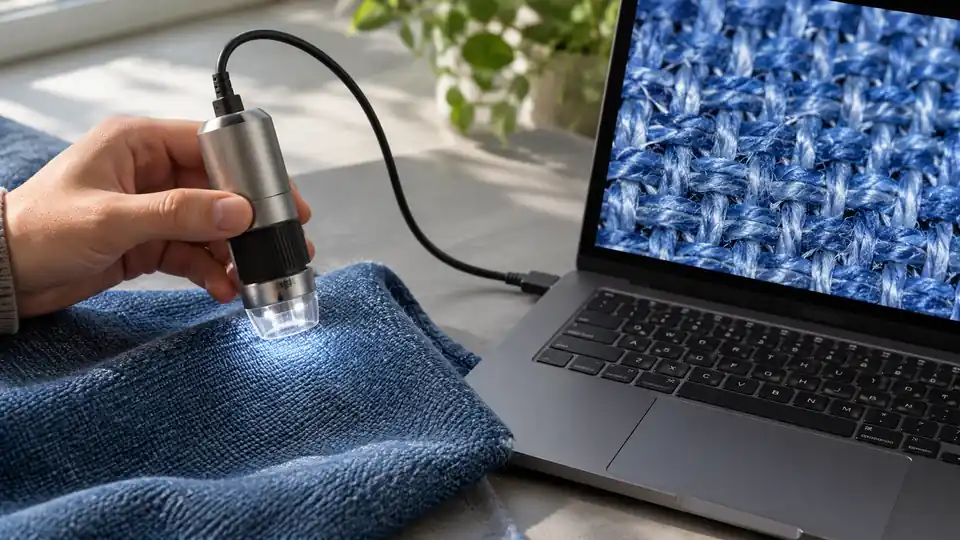
USB digital microscopes turn a laptop, tablet, or phone into a close-up inspection screen, but the useful differences hide beneath familiar claims such as “1000X” and “4K.” A coin collector needs controlled light and steady framing, while someone checking a circuit board may care more about focus control, cable access, and whether the camera works with a computer without extra software.
Connection details deserve a close look. Some models connect to a computer by USB and use standard webcam software, while others create a WiFi hotspot for iPhone or Android viewing and use USB for Windows or Mac. Smartphone support can also depend on OTG settings, app installation, or the supplied cable, so a microscope that looks universal on paper may feel far less flexible with a particular device.
This roundup weighs documented USB functionality, compatibility, lighting, focus control, mounting, image capture, and practical limitations rather than ranking products by advertised magnification alone. The Plugable USB Digital Microscope is the strongest general-purpose option because its 60X to 250X range, USB and USB-C connectivity, flexible arm stand, and broad computer support form a sensible inspection setup without relying on a headline magnification number.
Quick Answer
- Best Overall: Plugable USB Digital Microscope 250x, 2MP Micro Camera, Flexible Arm Stand for computer-based inspection, USB-C access, and a flexible mounting setup.
- Best Standalone Viewing: TOMLOV DM9 7″ Digital Coin Microscope 1200X, Soldering Scope for Adults for its built-in screen, adjustable stand, lighting controls, and onboard storage.
- Best for Measurement: Dino-Lite AM4113T for documented measurement features, MicroTouch capture, and included Windows and Mac software.
- Best Portable WiFi Option: Wireless Digital Microscope, Skybasic 50X-1000X Magnification for handheld use with iOS, Android, Windows, and Mac devices.
Best USB Digital Microscopes Comparison Table
| Product | Best For | Viewing Method | Connection | Advertised Magnification | Notable Feature |
|---|---|---|---|---|---|
| Plugable USB Digital Microscope 250x, 2MP Micro Camera, Flexible Arm Stand | General computer-based inspection | Computer, tablet, or handheld | USB and USB-C/Thunderbolt | 60X to 250X | Flexible arm stand and observation pad |
| TOMLOV DM9 7″ Digital Coin Microscope 1200X, Soldering Scope for Adults | Coins and bench inspection | Built-in 7-inch LCD or computer | USB and PC connection | Up to 1200X advertised | 12MP camera, 1080P video, 16GB card |
| Dino-Lite AM4113T | Measurement and documentation | Windows or Mac computer | USB | 20X to 50X, 200X optical | MicroTouch and measurement software |
| Jiusion 4K WiFi USB Digital Handheld Microscope with Professional Stand | Phone viewing with a taller stand | Phone, tablet, or computer | WiFi and USB | 50X to 1000X advertised | Adjustable aluminum alloy stand and case |
| Teslong USB-C Digital Microscope 10X-200X | Manual-focus coin and electronics work | Phone, Android device, or PC | USB-C | 10X to 200X | Rotating metal stand and three brightness levels |
| Bysameyee 1080P USB Digital Microscope with Metal Stand | Multi-device mobile and computer use | Phone or computer | USB-A, USB-C, Lightning, and Micro-USB | 50X to 1000X advertised | Four-in-one cable with capture button |
| USB Digital Microscope 40X to 1000X, 8 LED Magnification Endoscope Camera | Windows measurement on a budget | Computer or compatible Android device | USB and Android OTG | 40X to 1000X advertised | Windows measurement software and diffuser |
| PalliPartners Digital Microscope for Coins with Light HD Screen | Portable LCD inspection | Built-in 4.3-inch LCD | USB connection information not clearly specified | 50X to 1000X advertised | Rechargeable battery and 32GB card |
| Wireless Digital Microscope, Skybasic 50X-1000X Magnification | Handheld WiFi and USB viewing | Phone, tablet, or computer | WiFi and USB | 50X to 1000X advertised | 2MP sensor and 3 to 60 mm focal range |
The most useful pick depends on whether your inspection starts with a computer, phone, LCD screen, or measurement workflow.
1. Plugable USB Digital Microscope 250x, 2MP Micro Camera, Flexible Arm Stand — Best Overall

The Plugable takes a practical computer-first approach. Its 2MP camera covers a documented 60X to 250X range, and the flexible arm stand lets the user switch between handheld examination and a more controlled desktop setup. That combination fits coins, small components, classroom demonstrations, and casual electronics inspection where a laptop or tablet acts as the viewing screen.
USB and USB-C/Thunderbolt connectors widen the device options, while the webcam-style chipset supports Windows, Mac, ChromeOS, Linux, Android, and iPad according to the product information. The built-in LED halo has brightness control and a stated 7000K color temperature. Its 250X ceiling is lower than the enormous numbers printed on many inexpensive scopes, but the more restrained range is easier to interpret for ordinary surface inspection.
Pros
- Supports USB and USB-C/Thunderbolt connections.
- Works with Windows, Mac, ChromeOS, Linux, Android, and iPad according to the supplied specifications.
- Includes a flexible arm stand for hands-free positioning.
- Provides a 2MP camera with a documented 60X to 250X range.
- Includes an LED halo with brightness control and a 7000K color temperature.
Cons
- Its advertised range stops at 250X, which is lower than many inexpensive competing listings.
- Viewing depends on a connected device rather than a built-in LCD screen.
This is the best fit for buyers who want a USB microscope that can move between a laptop, tablet, and desktop stand. A standalone LCD model such as the TOMLOV DM9 is more suitable for screen-free viewing, while the Dino-Lite is the more specialized choice for measurement.
To buy this product, click here.
2. TOMLOV DM9 7″ Digital Coin Microscope 1200X, Soldering Scope for Adults — Best Standalone Viewing

The TOMLOV DM9 changes the USB microscope routine by putting a 7-inch LCD screen directly into the setup. A coin, solder joint, or small mechanical part can be viewed on that screen without making a laptop the center of the bench. Its adjustable metal stand and metal base provide a documented mounting structure, while the two flexible gooseneck lights allow illumination from different angles.
For documentation, the supplied specifications identify a 12MP camera, 1080P video, and a 16GB memory card. Those details make the DM9 particularly relevant to coin records and close-up project notes. The advertised 1200X figure should still be read as a magnification claim rather than proof of equivalent optical resolution, and the product should not be treated as a coin authenticator simply because it reveals surface marks.
Pros
- Includes a built-in 7-inch LCD screen.
- Provides a metal base and adjustable 8.5-inch metal stand.
- Offers eight built-in LEDs plus two flexible gooseneck lights.
- Lists a 12MP camera and 1080P video capability.
- Includes a 16GB memory card for captured images and records.
Cons
- The advertised 1200X figure does not establish optical resolution.
- Its larger screen-and-stand format is less compact than a handheld USB camera.
Choose the DM9 for a bench where shared viewing, coin surface documentation, and an independent screen matter. A Plugable or Dino-Lite is a cleaner match for buyers who want a computer-based USB camera without a built-in display.
To buy this product, click here.
3. Dino-Lite AM4113T – 1.3MP, 20x – 50x, 200x, Microtouch, Measurement — Best for Measurement

The Dino-Lite AM4113T is aimed at a different kind of USB microscope buyer. Rather than advertising an extreme magnification range, it identifies 20X to 50X and 200X true optical magnification, a 1.3MP image resolution, and 30 FPS video. That clearer specification language is useful for readers comparing inspection tools by documented optical modes rather than by a large digital number.
Its MicroTouch feature provides a dedicated image-capture control, while the included DinoCapture and DinoXcope software supports Windows and Mac work involving capture, annotation, and measurement. The listing identifies units including inches, millimeters, and micrometers, but software units should not be confused with guaranteed measurement accuracy. This is a more specialized purchase than a low-cost handheld scope, reflected in its much higher listed price.
Pros
- Lists 20X to 50X and 200X true optical magnification.
- Provides 1280 by 1024 image resolution.
- Lists 30 FPS video.
- Includes MicroTouch for image capture.
- Includes Windows and Mac software with measurement features.
Cons
- Its listed price is substantially higher than the other USB microscopes here.
- The supplied information identifies a 1.3MP camera, which is lower in megapixels than several competing listings.
The AM4113T suits users who need documented optical modes and measurement-oriented software more than a built-in screen or wireless phone viewing. Buyers seeking casual coin inspection or outdoor portability can spend far less with a handheld model.
To buy this product, click here.
4. Jiusion 4K WiFi USB Digital Handheld Microscope with Professional Stand — Best WiFi Stand Package

This Jiusion pairs a handheld camera with a taller professional stand made from aluminum alloy. The stand adjusts from 0 to 7.3 inches according to the product information, giving the user more positioning range than a tiny fixed base. Phone and tablet users can connect wirelessly, while a USB cable supports computer use, so the same microscope can move from a mobile screen to a desktop workflow.
The listing identifies 3840 by 2160P transmission, eight LEDs, focus and brightness controls, and phone or tablet zoom buttons ranging from 1.2X to 2.0X. Those zoom buttons do not work on Windows, Mac, Linux, or Chrome OS, which is a meaningful split in the feature set. The included carrying case adds convenience for storage, though the product remains a close-up digital camera rather than a traditional biological microscope.
Pros
- Supports WiFi phone and tablet viewing plus wired computer use.
- Includes an aluminum alloy stand adjustable from 0 to 7.3 inches.
- Lists 3840 by 2160P wireless video transmission.
- Provides eight built-in LEDs with focus and brightness controls.
- Includes a carrying case.
Cons
- The phone and tablet zoom buttons do not work on computers.
- The 4K listing describes transmission quality, not guaranteed 4K optical detail.
This model makes sense for users who want a WiFi microscope with a more adjustable stand than a basic handheld bracket. The Plugable is better for a straightforward USB webcam workflow, while the TOMLOV is better for independent LCD viewing.
To buy this product, click here.
5. Teslong USB-C Digital Microscope 10X-200X for Coin & Electronics Inspection — Best Manual-Focus USB-C Option

The Teslong takes a controlled, manual approach to close-up viewing. Its focus wheel covers a documented 10X to 200X range, allowing the user to move from a wider view of a coin or circuit board to a tighter look at a component. The USB-C connection is aimed at phones, Android devices, and PCs, and the product information says basic viewing requires no app.
Lighting is handled by eight LEDs with three brightness levels, while the cable includes a control dial. The rotating metal stand can turn 360 degrees and is intended for flat documents, curved coins, or vertical circuit boards. The included side-view mirror, protective covers, and ear specula broaden the kit, although the microscope’s USB-C format may be less convenient for buyers whose computers or phones require another connector.
Pros
- Provides a documented 10X to 200X manual-focus range.
- Uses USB-C for connection to listed phones, Android devices, and PCs.
- Includes eight LEDs with three brightness levels.
- Provides a rotating metal stand with 360-degree positioning.
- Includes a side-view mirror, protective covers, and ear specula.
Cons
- The supplied information does not identify iPhone Lightning compatibility.
- Its 200X advertised maximum is lower than several inexpensive 1000X listings.
Consider the Teslong if manual focus, lower-range viewing, and stand rotation matter more than a huge magnification number. The Bysameyee is a better fit for households needing several connector types, while the Dino-Lite is the more measurement-focused alternative.
To buy this product, click here.
6. Bysameyee 1080P USB Digital Microscope with Metal Stand — Best Multi-Connector Option
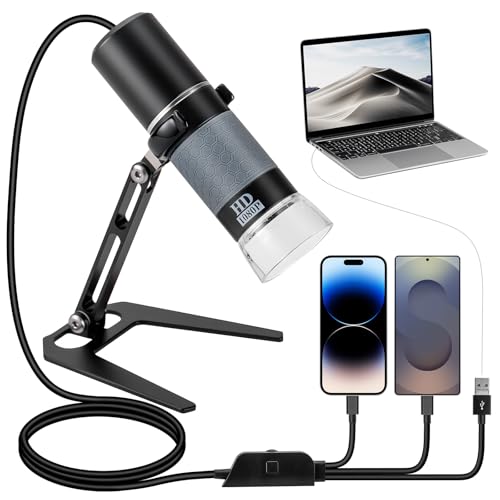
The Bysameyee focuses on connector flexibility. Its four-in-one cable includes USB Type-C, Lightning, Micro-USB, and USB-A connections, with the important qualification that mobile devices may require OTG support. That makes it useful for a mixed-device household where one person reaches for an iPhone and another uses an Android phone or Windows computer.
Capture and brightness controls sit on the cable rather than the microscope body. In practical terms, pressing a capture button or turning the brightness wheel can avoid reaching toward the camera itself. The product lists 1080P viewing, recording, and an eight-LED light source, but its 50X to 1000X range should be read as an advertised digital microscope range rather than proof of fine optical resolution at every setting.
Pros
- Includes USB-A, USB-C, Lightning, and Micro-USB connectors.
- Lists compatibility with iPhone, Android, Windows, and Mac devices.
- Provides 1080P viewing, photography, and video recording.
- Places capture and brightness controls on the USB cable.
- Includes a metal stand and eight adjustable LEDs.
Cons
- Mobile use depends on OTG support being enabled where required.
- The 50X to 1000X range does not establish optical resolution across the full range.
This is a sensible pick for users who regularly switch between device types and want a cable-mounted control layout. The Teslong offers a more modest manual-focus range, while the Plugable provides broader documented computer operating-system support.
To buy this product, click here.
7. USB Digital Microscope 40X to 1000X, 8 LED Magnification Endoscope Camera with Carrying Case & Metal Stand — Best Budget Measurement Pick
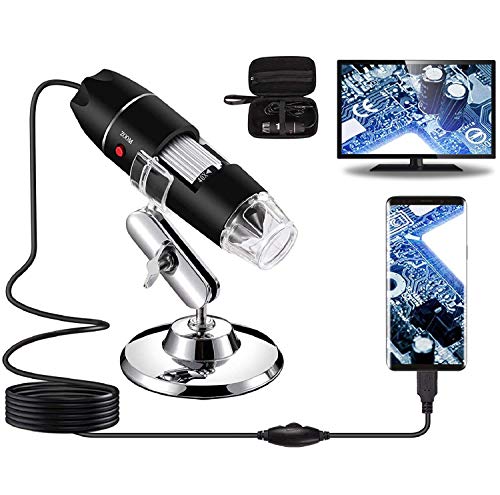
This Bysameyee USB microscope is aimed at basic inspection with a few useful extras. It supports Windows, Mac OS X, Linux, and Android phones with OTG, while the listing explicitly excludes iPhone and iPad. A metal stand, carrying case, OTG adapter, ruler, and driver are included, giving a budget buyer more setup pieces than a bare handheld camera.
The eight LEDs use a dimming control and a diffuser, which can be helpful with shiny coins, printed surfaces, or dark recesses where harsh light creates distracting highlights. The supplied Windows software includes measurement functionality, while capture and video recording are also identified. Those measurement tools support visual comparison, but they do not establish professional measurement accuracy without appropriate calibration and technique.
Pros
- Supports Windows, Mac OS X, Linux, and compatible Android OTG devices.
- Includes Windows measurement software.
- Provides eight LEDs with brightness control and a diffuser.
- Includes a metal stand, ruler, OTG adapter, and carrying case.
- Supports image capture and video recording.
Cons
- It does not work with iPhone or iPad according to the product information.
- The measurement function is identified for Windows users only.
This is a useful low-cost route for Windows users who want a ruler and measurement software in the box. The Bysameyee four-connector model is the better match for iPhone owners, while the Dino-Lite offers a more specialized measurement package.
To buy this product, click here.
8. PalliPartners Digital Microscope for Coins with Light HD Screen — Best Portable LCD Option

The PalliPartners is a standalone LCD microscope with a 4.3-inch screen, a rechargeable battery, and a metal bracket for hands-free use. The product information lists four to five hours of battery operation, which makes it more suitable for moving between inspection spots than a microscope that must remain beside a computer. A user can also operate it by hand without the bracket.
Its 2.0MP camera supports listed 1080P and 720P modes, and captured photos or videos are stored on the included 32GB microSD card. Eight adjustable LEDs provide direct lighting, while the focus wheel handles image adjustment. The product listing names coins, plants, insects, jewelry, circuit boards, and other objects as use cases, but it also states that the microscope is not suitable for cell or medical purposes.
Pros
- Includes a built-in 4.3-inch LCD screen.
- Lists a rechargeable battery with four to five hours of operation.
- Provides a 2.0MP camera with listed 1080P and 720P modes.
- Includes a 32GB microSD card for photos and videos.
- Offers eight adjustable LEDs and a metal bracket.
Cons
- The supplied information does not clearly establish its USB computer data functionality.
- The listing explicitly says it is not suitable for cell or medical purposes.
Pick this model for portable, screen-based inspection where a computer is inconvenient. The TOMLOV offers a larger display and a more substantial documented stand, while the Skybasic is more flexible for WiFi phone viewing.
To buy this product, click here.
9. Wireless Digital Microscope, Skybasic 50X-1000X Magnification — Best Portable WiFi Option

The Skybasic is a compact handheld microscope that can create its own WiFi hotspot for iOS and Android viewing, then switch to a USB connection for Windows or Mac computers. That two-route setup suits outdoor observation of leaves, insects, minerals, and surface details where carrying a laptop is awkward. The included bracket and base provide a way to move from handheld viewing to a supported position.
The product lists a 2MP HD CMOS sensor, 1920 by 1080 capture on smartphones, 720P computer output, eight adjustable LEDs, and a one-button photo or video control. Its stated focal length range is 3 to 60 mm, so keeping the specimen within that range matters for focus. The listing also describes the unit as closer to a fixed-focus magnifying glass than a traditional microscope, a useful boundary for buyers expecting biological slide work.
Pros
- Supports WiFi viewing on iOS and Android devices.
- Provides USB computer compatibility for Windows and Mac.
- Lists a 2MP HD CMOS sensor.
- Offers eight adjustable LED lights.
- Identifies a 3 to 60 mm focal length range and one-button capture.
Cons
- Computer viewing is listed at 720P, below the 1920 by 1080 smartphone capture specification.
- The product is described as a fixed-focus magnifying glass rather than a traditional microscope.
This Skybasic model is a good match for handheld WiFi exploration and quick surface checks across phone and computer devices. The Jiusion professional-stand model provides a taller adjustable stand and a case, while the Plugable is better suited to a standard USB computer workflow.
To buy this product, click here.
Buying Guide
Start With The Viewing Device
A USB microscope may send video to a computer, phone, tablet, or a built-in display, and those workflows feel very different. The Plugable uses USB and USB-C/Thunderbolt connections for computer and tablet work, while the Skybasic and Jiusion 4K models add WiFi phone viewing. A built-in LCD model such as the TOMLOV DM9 avoids the need for a separate viewing device altogether.
Read Magnification Claims Carefully
Numbers such as 1000X and 1200X describe advertised enlargement, not guaranteed fine-detail resolution. Digital zoom can make the image larger without revealing new specimen detail. Products with clearer optical specifications, such as the Dino-Lite’s listed 20X to 50X and 200X modes, are easier to evaluate than models that provide only a broad maximum figure.
Match Focus Control To The Subject
Manual focus can be helpful for coins, circuit boards, and raised surface details because the user can settle the image at a chosen distance. The Teslong identifies a manual focus wheel and a 10X to 200X range, while the Skybasic lists a 3 to 60 mm focal length range. A scope’s advertised magnification does not tell you how easily a particular object will remain sharp.
Give The Stand A Real Job
A stand matters most when the camera must remain in one position while a coin, board, or component is adjusted beneath it. Flexible arms, metal bases, rotating mounts, and height-adjustable columns offer different kinds of positioning. The TOMLOV emphasizes a metal base and adjustable stand, the Teslong offers 360-degree rotation, and the Jiusion professional version lists adjustment from 0 to 7.3 inches.
Control Light On Reflective Objects
Coins, polished metal, jewelry, and solder joints can throw bright reflections directly into the camera. Adjustable brightness is more useful than a bare LED count, and a diffuser or multiple light positions can change the appearance of surface marks. The Bysameyee budget microscope includes a diffuser, while the TOMLOV combines built-in LEDs with flexible gooseneck lights.
Check Software And Operating-System Details
USB describes a connection, not universal compatibility. The Dino-Lite includes named Windows and Mac software, the Plugable identifies broad operating-system support through standard webcam software, and the Skybasic requires app and camera-permission steps for some setups. Android OTG requirements also appear on several models, so check the specific phone or tablet before assuming a cable will work.
Separate Inspection From Biological Microscopy
These products are primarily digital inspection cameras for opaque objects such as coins, circuit boards, insects, rocks, and surface materials. High advertised magnification does not prove that a device can resolve bacteria, cells, or subcellular structures. The Skybasic listing specifically distinguishes its fixed-focus magnifying-glass style from a traditional microscope, and the PalliPartners listing excludes cell and medical use.
Best USB Digital Microscopes FAQ
What Is The Best USB Digital Microscope Overall?
The Plugable USB Digital Microscope is the strongest general-purpose pick in this group because it combines USB and USB-C/Thunderbolt connections, broad operating-system support, a flexible arm stand, adjustable lighting, and a documented 60X to 250X range. It is a computer-oriented inspection camera rather than a standalone LCD microscope.
Does A USB Microscope Work With An iPhone?
Some do, but the connection method matters. The Skybasic and Jiusion WiFi models identify iPhone and iPad support, while the Bysameyee model lists a Lightning connector and OTG-related requirements. A USB-C plug alone does not prove compatibility with every iPhone, so check the specific connector and app requirements.
Is 1000X Magnification Better Than 250X?
Not automatically. Advertised magnification describes enlargement, while resolution describes the ability to distinguish fine details. A 1000X image may be digitally enlarged or difficult to use at the highest setting, so focus control, lighting, mounting, and the captured image quality matter more than the largest printed number.
Can These USB Microscopes Inspect Circuit Boards?
Several are listed for PCB or electronics inspection, including the Plugable, TOMLOV, Teslong, and PalliPartners models. A stand can help keep the camera positioned, and adjustable lighting can reveal component markings or solder joints. The supplied information does not establish electrical safety, ESD protection, or suitability for every powered-board repair task.
Which USB Microscope Is Best For Coins?
The TOMLOV DM9 is the most specialized coin-oriented option because it includes a 7-inch screen, adjustable stand, multiple lighting positions, a 12MP camera, 1080P video, and a 16GB card. It can document surface details, but magnified images do not independently authenticate a coin, establish its grade, or prove that a mark is a genuine mint error.
Do USB Microscopes Need Special Software?
Requirements vary. The Plugable is described as using standard webcam software across many systems, while the Dino-Lite includes DinoCapture and DinoXcope. The Skybasic uses the Max-see app for WiFi phone operation and may require camera-permission changes on computers. Read the operating-system and app notes before assuming plug-and-play behavior.
Are These Microscopes Suitable For Viewing Cells?
Do not assume so. The listed products are primarily intended for surface inspection, coins, electronics, insects, rocks, jewelry, and similar opaque subjects. High advertised magnification alone does not establish the optical resolution, illumination, or specimen preparation needed for biological cell work.
What Matters More, Lighting Or Magnification?
For many inspection tasks, controllable lighting is the more immediately useful feature. Glare can hide a coin mark or solder joint, while uneven shadows can make a surface look misleading. Adjustable LEDs, diffusers, and flexible light sources help shape the view, but no lighting arrangement guarantees that every reflective object will appear without glare.
Final Verdict
The Plugable USB Digital Microscope is the best overall USB choice because it keeps the core workflow clear: connect to a computer or tablet, position the camera with its flexible arm stand, adjust the LED halo, and inspect within a documented 60X to 250X range. Its specifications are more restrained than the biggest magnification claims, which makes the product easier to evaluate for ordinary surface inspection.
Different priorities point elsewhere. Choose the TOMLOV DM9 for an integrated LCD bench setup, the Dino-Lite AM4113T for documented optical modes and measurement software, the Jiusion professional-stand model for WiFi phone viewing with more stand adjustment, or the Skybasic for compact handheld use. Buyers who need a particular phone connector, measurement workflow, or independent screen should verify that detail before treating USB support as a complete compatibility guarantee.
