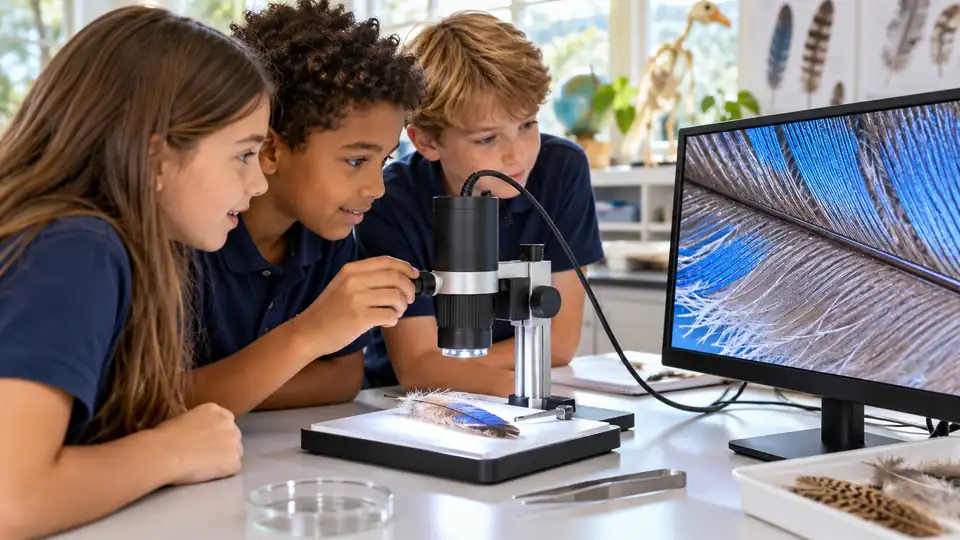
A classroom microscope has to do more than enlarge a specimen. Students need to see the image clearly, teachers need a practical way to share it, and the setup should match the lesson, whether that means prepared slides, leaves, insects, fibers, or small surface details. A built-in screen can simplify group viewing, while a compound optical system is better suited to slide-based biology.
Advertised magnification deserves a careful reading. Numbers such as 1,600x or 2,000x may include digital enlargement, so they do not automatically prove finer optical detail. For classroom use, the viewing method, slide control, illumination, image capture, and connection options often matter more than the largest number printed on the box.
The strongest options below cover different teaching situations. The Celestron TetraView offers a classroom-friendly LCD workflow with prepared slides and video capture, while the PalliPartners compound microscope provides a more traditional slide platform. Portable handheld models suit outdoor observation and younger students, but they should not be treated as replacements for compound microscopes in cellular work.
Quick Answer
- Best Overall: Celestron TetraView LCD Digital Microscope with 180° Swivel Screen for its built-in display, prepared slides, image capture, and AV output.
- Best Compound Microscope: PalliPartners 40x-2000x Biological Compound Trinocular Microscope for slide-based lessons, dual illumination, and a trinocular viewing path.
- Best Classroom Screen: TOMLOV DM301 Pro Microscope for Kids Adults Students, 7″ Screen Science Kit for its large display, wireless app support, USB/HD output, and included learning accessories.
- Best for Portable Student Exploration: Odatay 4K 1000X Digital Microscope for Kids with 32G Card, Long Distance Viewing & 2.4″ Screen Portable Handheld Edu Toys for Age 3-12 Exploring Bugs Plants at Home Classroom & Outdoor Travel, Blue for its compact design, prepared slides, storage card, and tripod mounting point.
Best Digital Microscopes for Classrooms Comparison Table
| Product | Best For | Viewing Method | Capture And Connection | Advertised Magnification | Notable Classroom Feature |
|---|---|---|---|---|---|
| Celestron TetraView LCD Digital Microscope with 180° Swivel Screen | General classroom biology | 4.3-inch LCD | 5MP camera, SD video, AV output | 40x to 1600x with digital zoom | Prepared slides and carrying case |
| PalliPartners 40x-2000x Biological Compound Trinocular Microscope | Slide-based biology | Eyepieces and trinocular port | Camera connection supported by trinocular design | 40x to 2000x | Coarse and fine focus with dual LED lighting |
| TOMLOV DM301 Pro Microscope for Kids Adults Students, 7″ Screen Science Kit | Shared student demonstrations | 7-inch IPS screen | 8MP photos, 1080P video, WiFi, USB/HD output | Advertised up to 1200x | Built-in measurement scale and included slides |
| Celestron LCD Digital Microscope II – 3.5″ Rotating LCD Touchscreen | Group viewing and documentation | 3.5-inch rotating LCD touchscreen | 5MP camera, 30 fps video, SD card, TV output | 40x to 1600x | Mechanical stage and dual illumination |
| Celestron Labs Digital Wi-Fi Desktop Microscope – Use with iOS and Android | Smart-device classroom imaging | Compatible iOS or Android device | WiFi app, video, measurement tools | 48x, 120x, and 480x | Plan achromatic objectives and X/Y stage |
| TOMLOV DM9 7″ Digital Coin Microscope 1200X, Soldering Scope for Adults | Metal Base, Ultra-Precise Focus, 12MP Photo/1080P Video, 10 LEDs, Error Coin View, PCB Repair, for Collectors, PC View, 16GB | Surface-detail demonstrations | 7-inch LCD | 12MP photos, 1080P video, PC connection, 16GB card | Advertised up to 1200x | Adjustable stand and flexible lighting |
| Odatay 4K 1000X Digital Microscope for Kids with 32G Card, Long Distance Viewing & 2.4″ Screen Portable Handheld Edu Toys for Age 3-12 Exploring Bugs Plants at Home Classroom & Outdoor Travel, Blue | Portable nature lessons | 2.4-inch screen | Photo and video capture, PC connection | 200x to 1000x | 32GB card, prepared slides, tripod hole |
| HEWEIMEI 1600X Microscope for Kids, 1080P 4.0″ Digital Screen Kids Microscopes with Slides Kit, Educational Science Toys for Christmas Birthday Gifts for 3-14 Year Old Children Students | Young students and flexible handling | 4.0-inch IPS screen | 1080P photos and video | 100x to 1600x | Desktop, handheld, and portable modes |
| Wireless Digital Microscope, Skybasic 50X-1000X Magnification WiFi Portable Handheld Microscopes with Adjustable Stand HD USB Microscope Camera Compatible with iPhone Android iPad Windows Mac Computer | Budget mobile and computer viewing | Phone, tablet, or computer | WiFi and USB, 1080P smartphone images | 50x to 1000x | Documented 3 to 60 mm focal length range |
Each recommendation solves a different classroom problem, so the review details matter more than the headline magnification.
1. Celestron TetraView LCD Digital Microscope with 180° Swivel Screen — Best Overall

The TetraView fits a broad classroom routine because its 4.3-inch color LCD lets students view a specimen without taking turns at a single eyepiece. Its built-in 5MP camera captures still images and 20 fps SD video, giving a teacher a way to save observations for lab reports or project presentations. The included seven prepared slides also reduce the gap between opening the box and starting a lesson.
The 180-degree swivel screen and AV output make shared viewing more practical, while the supplied carrying case helps with storage between classrooms. Its 40x to 1600x range includes digital zoom, so the highest figure should be treated as an enlargement setting rather than proof of equivalent optical resolution. The LCD workflow is convenient, but buyers seeking a conventional binocular or trinocular experience should look elsewhere.
Pros
- Built-in 4.3-inch color LCD supports group viewing.
- Captures still images and 20 fps SD video.
- Includes seven prepared slides for immediate lessons.
- Provides AV output for viewing on a TV or projector.
- Includes a carrying case, dust cover, and international AC adapter.
Cons
- The advertised 1600x range includes digital zoom.
- The screen is smaller than the 7-inch displays on selected alternatives.
Choose this model for a general science classroom that needs standalone viewing, saved observations, and a useful starter slide set. A compound microscope is a better fit for lessons centered on conventional eyepiece work or deeper slide preparation.
To buy this product, click here.
2. PalliPartners 40x-2000x Biological Compound Trinocular Microscope — Best Compound Microscope

This PalliPartners model takes a different route from the LCD units. It is a biological compound microscope with a double-layer stage, separate coarse and fine focus controls, and top and bottom LED illumination. That combination is relevant for classroom slides because the stage is intended to hold glass specimens while transmitted and reflected lighting can address different sample types.
The trinocular head is the central distinction. Students can use the eyepieces while a camera or other imaging device connects through the third viewing path, which supports documentation and shared instruction. The 40x to 2000x range is advertised, but the number alone does not establish cellular resolving power. The listing also does not identify a camera as included, so a classroom planning digital recording should budget for a compatible imaging device.
Pros
- Uses a compound optical configuration for slide-based observation.
- Includes separate coarse and fine focus controls.
- Provides a double-layer stage for positioning glass slides.
- Offers top and bottom LED illumination.
- Trinocular design allows eyepiece viewing alongside camera use.
Cons
- The product information does not identify a camera included with the microscope.
- It does not provide a built-in LCD for students to view together.
This is the better classroom fit for biology instruction built around prepared slides and conventional microscope handling. A standalone LCD model will be easier for broad demonstrations where every student needs a direct screen view.
To buy this product, click here.
3. TOMLOV DM301 Pro Microscope for Kids Adults Students, 7″ Screen Science Kit — Best Classroom Screen

The DM301 Pro is built around a large 7-inch IPS display, which gives a class a more visible shared image than a small handheld screen. Its adjustable viewing angle, USB/HD output, and mobile app support create several ways to show observations during a lesson. The included slides and accessories also give students something concrete to examine before the class starts collecting its own specimens.
The product information lists 8MP photos, 1080P video, dual LED illumination, and an integrated measurement scale. Those features can support a project in which students capture an image, compare specimens, and record an observation. The advertised 1200x figure should still be read cautiously, and the listing’s claims about cell study do not establish that every cellular structure will be resolved clearly.
Pros
- Provides a 7-inch IPS screen for shared viewing.
- Supports USB/HD output to larger classroom displays.
- Offers WiFi app support on iOS and Android.
- Captures 8MP photos and 1080P video.
- Includes a built-in measurement scale and learning accessories.
Cons
- The advertised 1200x figure does not by itself establish optical resolution.
- Wireless app use adds a device and connection step to the lesson setup.
Teachers who want one screen-centered unit for demonstrations, documentation, and student use should look closely at this model. A compound trinocular microscope remains more appropriate for lessons where optical slide work is the priority.
To buy this product, click here.
4. Celestron LCD Digital Microscope II – 3.5″ Rotating LCD Touchscreen — Best for Group Documentation

The Celestron LCD Digital Microscope II uses a 3.5-inch rotating LCD touchscreen, so a teacher can angle the display toward a small group without requiring eyepiece sharing. Its mechanical stage gives students controlled X/Y slide movement, while top and bottom LED illumination accommodates specimens that need different lighting directions.
Image capture is a major classroom advantage here. The 5MP camera records still images and 30 fps video to an SD card, and the included TV output supports larger-screen presentations. The optical objectives provide 40x, 100x, and 400x powers before the LCD’s digital zoom reaches the advertised 1600x total, making the distinction between optical power and digital enlargement especially relevant.
Pros
- Rotating LCD supports shared viewing around a classroom table.
- Mechanical stage provides controlled slide positioning.
- Includes 4x, 10x, and 40x objectives.
- Captures 5MP still images and 30 fps video.
- Offers SD storage and TV output for presentations.
Cons
- The built-in screen is 3.5 inches, smaller than several alternatives here.
- Four AA batteries are required for field use and are not included.
This model suits teachers who value stage control, dual illumination, and saved video more than a large display. The DM301 Pro is a better match for a wider screen and wireless mobile viewing.
To buy this product, click here.
5. Celestron Labs Digital Wi-Fi Desktop Microscope – Use with iOS and Android — Best Smart-Device Classroom Microscope
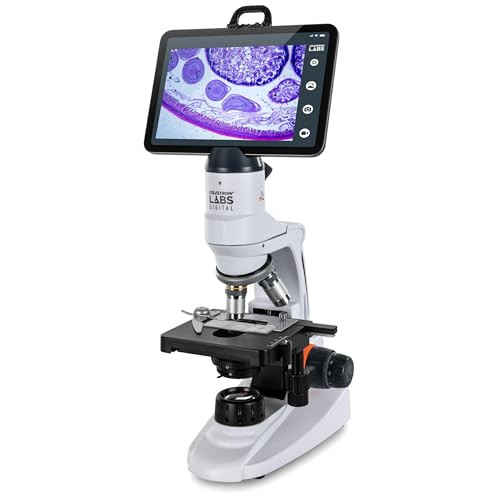
This Celestron uses an iOS or Android device as the viewing and capture interface. Its three plan achromatic objectives provide listed magnifications of 48x, 120x, and 480x with the digital eyepiece, while the mechanical X/Y stage gives students a controlled way to move a slide through the image. That is a more structured slide workflow than a pocket inspection camera.
The WiFi app supports live images, video recording, and specimen measurement, and the kit includes a calibration ruler, five prepared slides, and a magnetic smart-device stand. The trade-off is clear: classroom use depends on a compatible iOS or Android device rather than a built-in LCD. The supplied information does not identify the app’s measurement accuracy, so measurements should be treated as classroom observations that require calibration and sensible limits.
Pros
- Uses plan achromatic 4x, 10x, and 40x objectives.
- Supports live viewing and capture through an iOS or Android app.
- Includes a mechanical X/Y stage for slide movement.
- Provides measurement functions and a calibration ruler.
- Includes five prepared slides and a magnetic device stand.
Cons
- Requires an iOS or Android device for its viewing workflow.
- The listing does not identify measurement accuracy or precision.
This is a sensible choice for a classroom that already uses tablets or phones and wants app-based capture and measurement. A built-in LCD model removes the device-management step for a simpler shared demonstration.
To buy this product, click here.
6. TOMLOV DM9 7″ Digital Coin Microscope 1200X, Soldering Scope for Adults | Metal Base, Ultra-Precise Focus, 12MP Photo/1080P Video, 10 LEDs, Error Coin View, PCB Repair, for Collectors, PC View, 16GB — Best for Surface-Detail Demonstrations

The DM9 is a surface-inspection microscope with a 7-inch screen, adjustable metal stand, and lighting that combines built-in LEDs with two flexible gooseneck lights. That setup makes it useful for lessons involving coins, rocks, fabric, plant surfaces, small components, or other opaque objects where lighting angle changes what students can see.
Its 12MP photo and 1080P video claims support project records, and the included 16GB memory card provides storage without an extra purchase. A Windows or Mac computer can display the live view at a larger size. The product is less suited to traditional biological slide work because the documented design centers on close-up surface inspection rather than a compound optical system.
Pros
- Provides a 7-inch LCD for classroom demonstrations.
- Includes an adjustable metal stand for positioning the camera.
- Combines built-in LEDs with two flexible gooseneck lights.
- Captures 12MP photos and 1080P video.
- Includes a 16GB memory card and computer connection.
Cons
- The design is oriented toward opaque surface inspection rather than compound slide microscopy.
- The advertised 1200x figure does not establish biological resolving power.
Use this TOMLOV for tactile demonstrations involving coins, materials, specimens, and small parts. Choose the PalliPartners or another compound model for lessons that depend on conventional transmitted-light slide observation.
To buy this product, click here.
7. Odatay 4K 1000X Digital Microscope for Kids with 32G Card, Long Distance Viewing & 2.4″ Screen Portable Handheld Edu Toys for Age 3-12 Exploring Bugs Plants at Home Classroom & Outdoor Travel, Blue — Best for Portable Student Exploration

The Odatay is aimed at movement. Its 0.5-pound handheld body, neck strap, 2.4-inch screen, and 200x to 1000x advertised range make it practical for outdoor observations involving leaves, insects, soil, and other accessible objects. The lowest setting is described for longer-distance viewing, which is useful when a student wants to inspect a larger object without pressing the lens against it.
The classroom kit includes 12 prepared slides, a 32GB TF card, a slide-viewing cover, and a tripod hole. Students can capture photos or video, then transfer files to a PC for a simple observation journal. The small screen is convenient for individual use but less suitable for a full-class demonstration, and the 4K label does not by itself establish native sensor or optical detail.
Pros
- Lightweight 0.5-pound form supports outdoor lessons.
- Includes a 2.4-inch screen for standalone viewing.
- Offers 200x to 1000x advertised magnification settings.
- Includes 12 prepared slides and a 32GB TF card.
- Provides a tripod hole and PC connection for file transfer.
Cons
- The 2.4-inch display is less suitable for whole-class viewing.
- The 4K label does not establish native sensor resolution or optical detail.
This is a useful pick for rotating student stations, nature walks, and take-home observation projects. A larger LCD microscope is a better classroom centerpiece when several students need to watch the same image.
To buy this product, click here.
8. HEWEIMEI 1600X Microscope for Kids, 1080P 4.0″ Digital Screen Kids Microscopes with Slides Kit, Educational Science Toys for Christmas Birthday Gifts for 3-14 Year Old Children Students — Best for Flexible Student Handling
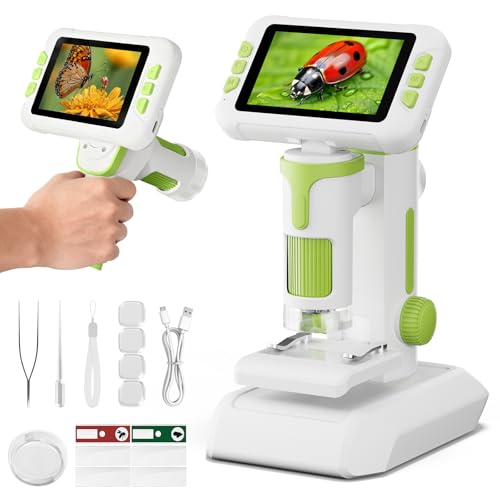
The HEWEIMEI offers three documented modes: desktop, handheld, and portable. That flexibility can support a classroom rotation where one student examines a mounted specimen, another carries the unit outdoors, and a third records a close-up at a desk. Its 4.0-inch IPS screen and six adjustable LED lights keep the viewing workflow self-contained.
The product information lists 1080P photo and video capture, a 100x to 1600x advertised range, and a built-in non-removable battery. Those details make it suitable for exploratory lessons involving insects, fibers, sand, and plant surfaces. The listing does not identify a larger-display output or a compound optical configuration, so it should be viewed as a flexible educational inspection device rather than a replacement for a biological lab microscope.
Pros
- Supports desktop, handheld, and portable operating modes.
- Provides a 4.0-inch IPS screen.
- Offers six LED lights with three brightness modes.
- Captures 1080P photos and video.
- Includes a slides kit for student activities.
Cons
- The battery is built in and non-removable.
- The product information does not identify output to a larger classroom display.
Pick this model for younger learners who benefit from switching between tabletop and outdoor observation. For a teacher-led demonstration with a larger shared image, the 7-inch TOMLOV DM301 Pro is a stronger fit.
To buy this product, click here.
9. Wireless Digital Microscope, Skybasic 50X-1000X Magnification WiFi Portable Handheld Microscopes with Adjustable Stand HD USB Microscope Camera Compatible with iPhone Android iPad Windows Mac Computer — Best Budget Mobile And Computer Option

The Skybasic gives a classroom two viewing paths. Students can connect through the microscope’s WiFi hotspot to an iPhone, iPad, or Android device, or use a USB connection with a Windows or Mac computer. Its adjustable stand is useful for a station that needs repeatable positioning, while the documented 3 to 60 mm focal length range gives students a practical distance window to work within.
The 2MP CMOS camera supports listed 1920×1080 smartphone images and 720P computer images, with eight adjustable LEDs for close-up objects such as leaves, minerals, insects, and fabric. The listing describes it as a fixed-focus magnifying glass rather than a traditional microscope, so it is better for surface exploration than serious biological slide work. Older app versions may create connectivity problems, and the supplied USB cable does not include an adapter.
Pros
- Supports WiFi viewing with iOS and Android devices.
- Provides USB computer use with Windows and Mac computers.
- Includes an adjustable stand and portable handheld body.
- Offers eight adjustable LED lights.
- Documents a 3 to 60 mm focal length range.
Cons
- The listing describes it as a fixed-focus magnifying glass rather than a traditional microscope.
- USB computer output is listed at 720P, lower than the stated smartphone image resolution.
This model makes sense for low-cost observation stations that already have classroom phones, tablets, or computers. Select a compound microscope for slide-based biology, or an LCD unit when students need a display without managing a separate device.
To buy this product, click here.
Buying Guide
Start With The Lesson Format
A classroom focused on prepared slides needs a different instrument from one studying leaves, rocks, insects, or fabric. Compound models such as the PalliPartners use a stage and objective system intended for slide work, while handheld and LCD inspection models are more natural for opaque objects. A microscope that matches the specimen saves lesson time and avoids forcing the wrong type of image into the activity.
Choose A Shared Screen Or Individual Viewing
Built-in LCD models let students gather around one image without sharing eyepieces. Larger displays, such as the 7-inch screen on the TOMLOV DM301 Pro, are easier to see across a table than the 2.4-inch display on the Odatay. WiFi models can show live images on phones or tablets, but the teacher must manage device connections and the relevant app.
Read Magnification Claims Carefully
Advertised magnification may combine optical magnification with digital zoom or display enlargement. A higher number can produce a larger image without revealing additional specimen detail. For classroom comparisons, give more weight to the optical configuration, stage control, focus system, illumination, and the actual specimen type than to the maximum number alone.
Look At Illumination And Specimen Positioning
Transparent slides commonly need light from below, while coins, leaves, fibers, and small objects are often viewed with reflected light from above. Dual illumination is useful across varied lessons, and adjustable brightness helps manage dark or reflective specimens. A flexible stand or mechanical stage also gives students more control over where the specimen sits in the image.
Plan The Image Workflow
Still photos can support lab reports, while video helps document an observation or demonstrate a process. Check whether files save to an SD or TF card, a built-in memory system, a mobile device, or a computer. Also separate image capture from display output. A microscope may save photos yet offer no direct connection to a projector or larger monitor.
Check Device And Software Requirements
WiFi does not mean every phone will provide the same experience. Confirm whether the model uses iOS, Android, Windows, or Mac software, and note whether classroom computers need a separate application. A self-contained LCD microscope reduces these compatibility tasks, while an app-based model may fit a school already equipped with managed tablets.
Set Boundaries For Biological Claims
High advertised magnification does not prove that an inexpensive digital inspection microscope can resolve bacteria, cells, or fine internal structures. Compound optical systems with appropriate objectives and slide illumination are more relevant for biological microscopy, but the product information still should not be treated as proof of a specific resolution capability. Match the microscope to the learning goal rather than promising detail the specification does not establish.
Best Digital Microscopes for Classrooms FAQ
What Type Of Digital Microscope Is Best For A Classroom?
For broad demonstrations, a model with a built-in LCD, image capture, and a way to show the view to several students is practical. For biology lessons centered on prepared slides, a compound microscope with controlled stage movement, fine focus, and suitable illumination is usually the more relevant design.
Is Higher Magnification Better For Classroom Use?
No. Advertised magnification may include digital enlargement, and enlargement does not automatically add optical detail. The specimen, lighting, focus control, stage movement, and viewing method often matter more than the highest advertised number.
Can A Handheld Digital Microscope Replace A Compound Microscope?
Usually not for slide-based biology. Handheld models are useful for opaque surfaces such as leaves, insects, rocks, fibers, and coins. Compound microscopes use a different optical and stage arrangement intended for prepared slides, so the two categories serve different lessons.
Are LCD Microscopes Useful For Group Viewing?
Yes. A built-in LCD allows several students to see the same live image without sharing an eyepiece. Screen size and viewing angle still matter, so a larger display or rotating screen is generally more practical for a group than a very small handheld screen.
Should A Classroom Microscope Have Photo And Video Capture?
Capture is useful for lab reports, student presentations, and comparing specimens later. Check where files are saved and how they transfer. A listed camera resolution does not automatically establish optical detail, so image capture should support the lesson rather than determine the entire purchase.
Do WiFi Microscopes Work With Every Phone Or Tablet?
No. Compatibility depends on the documented operating systems, app, connection method, and device settings. A classroom should confirm the relevant iOS or Android support and plan for app permissions or connection steps before relying on a WiFi microscope for a lesson.
What Lighting Does A Classroom Microscope Need?
Transparent slides often benefit from illumination below the specimen, while opaque objects usually need light from above. Dual lighting gives a microscope broader classroom use. Adjustable brightness is helpful because reflective surfaces can show glare under excessive or poorly positioned light.
Can Classroom Microscopes Measure Specimens Accurately?
Some models provide measurement tools or a scale overlay, but the supplied feature does not automatically establish measurement accuracy. Calibration, specimen position, image quality, and the software workflow all affect the result. Treat measurements as instructional observations unless the product provides stronger documented accuracy information.
Final Verdict
The Celestron TetraView is the strongest overall classroom fit because it combines a built-in color display, prepared slides, still and video capture, and AV output in one self-contained workflow. It can support demonstrations, documentation, and shared observation without requiring every student to use a separate device.
Classrooms centered on prepared biological slides should look to the PalliPartners compound model, while the TOMLOV DM301 Pro suits teachers who want a larger screen, mobile control, and USB/HD display options. The Celestron LCD Digital Microscope II adds a mechanical stage and rotating screen, and portable models such as the Odatay or HEWEIMEI are better for individual exploration and outdoor activities. The key decision is the specimen and teaching format, not the largest magnification figure.
